iA Writer’s “AI Detector”

Putting pineapple on a pizza is a way. Not the way. There may be something adversarial about pineapple pizza if you hate Italy, but Word definitely belongs to the Empire and not to the rebels.

The proper app if you want to write on a simulated sheet of paper is Indesign. People that really love paper and control still swear on QuarkXPress. I know… On the Mac, Pages is free and a bit leaner and less buggy than Word.

Errr …no. There is no proper app. There are only apps that suit particular tasks or workflows. There is a vast difference between a desktop publishing app and a Word Processor. I would never recommend one to do the work of the other.

Word is the comfortable armchair that you’ve used for the past 30 years. It’s worn to your shape, you know it well and it’s your dependable friend.

2 Likes

Perhaps more like a Frenemy. :joy:

I’ve never really had any problems with Word. I may have issues with Microsoft, but the Word app has never been problematic for me, rather it’s helped me produce a ton of good work.

1 Like

I’ve never had “trouble” with Word and I’ve produced a lot with it, including a doctoral dissertation. But, it is not a pleasure to use. It’s highly functional but unless I need a Word specific feature, I much prefer programs like Pages, Scrivener, or Ulysses.

1 Like

Yes, “a proper app to write on a simulated piece of paper” is a particular task. That task (I was referring to the previous entry) would be layouting. If it’s a private letter, Word will do. Indesign and Quark (so my graphic design friends tell me) do a better job at layout. They are “proper” layouting apps. That is what I meant by proper.

Word does layout, too, it does everything more or less okay, but few things well. Most people won’t care about the difference in font rendering and stuff that paper graphic designers care about. So yeah, an armchair for writing, is quite well put.

I used to work as a MS Word teacher (this is where my motivation to make a writing app for writing came from). I don’t know the very latest versions as I avoid it like the pest. Yet, up until recently it had bugs from the nineties (list elements you can’t get out of, text image boxes that mess up everything, auto formatting, master templates that go wild). Most people encounter those sooner or later. I knew them and their remedies because that was basically my job.

If you want something that does everything more or less okay, but nothing really well: Word will feel like an armchair.

Or a neccessary tool that people need to use for work at an office job.

@Oliver_Reichenstein I’m an iA Writer devotee and enjoy writing in it just as it is. I’m a non-coder but still prefer seeing the markdown syntax. Unlike apps that rely on live previews or databases, iA Writer allows me to directly view the markdown syntax, which suits my writing style. When I want to visualize the rendered text, I simply click the handy preview button.

On a side note, there’s a trending challenge among bloggers to share their default apps list. With over 200 bloggers participating, it’s striking to see the widespread adoption of iA Writer. Here’s a link to the list: https://defaults.rknight.me/ You may want to check it out.

1 Like

Yes, it is, but it does depend on what kind of writing and the end product. An A4 poster or flyer may be better suited to a DTP app. In contrast, a handout for students may be better in Word.

I dispute this. It does many things exceptionally well.

I have used Word to print three large textbooks. I’ve used Word to produce teaching material at an accredited level. Yes, there have been frustrations, but it has served me well. Most of my frustrations were solved by learning how to do things in Word.

My examples may be fringe. The average user may need to write a letter, an essay, a memo, a project proposal or just make some notes. IMO, comparing Word for most everyday uses to Markdown and making Markdown the winner is laughable. Markdown has its uses, but sharing your work, styling your work, and adding branding is all an epic fail in Markdown, in my experience. Digital gardening or keeping your atomic notes system may all be excellent in markdown. But for anyone in a working life who needs to write reports, brand their work, prepare handouts or share their work, Word is an indisputable king or an open source equivalent.

And don’t get me on to headers and footers or adding a simple logo in Markdown.

Nothing further from the truth. If you want an app that will fulfil 99% of your text-writing needs and produce good-looking documents in a wide range of formats, then Word is your toolbox. Any user will find it a darn sight easier to create a fully formatted good piece of work in Word than ever they will in Markdown.

SIDENOTE
I’m not saying Word is perfect by any stretch of the imagination. I’m trying to balance this unfounded vitriol that some seem to have when discussing Word. The bottom line is that Word is a very good and capable Word Processor, no matter how you feel about Microsoft.

1 Like

Word neither does writing exceptionally well nor does it do layout exceptionally well. Nor versioning. Nor Visual Basic development (alt F11 I think), Wildcards, Document automation, Macrorecording, Styles and Templates, Image Editing, Spellcheck, Grammarcheck, Collaboration or Focus Mode.

I know all of these from my time as a teacher—except Focus Mode they copied that label from us much later. My job was teaching kids how to use MS Word and its functions for years and all these functions have their bugs. Data loss and file corruption are everything but uncommon due to the complexity of everything that Word does, and that you don’t experience that (maybe with a more limited use, by mostly just writing) is great for you. But it doesn’t mean that it doesn’t exist.

Sure, if you know how to avoid the bugs you can get things done. But they are bugs nevertheless.

It does a lot and it does it in a more or less okay way. But nothing is really well done. It’s a Microsoft product. They are famous for business acument, not for user centered design. From a designer’s point of view this is not an unfair or all too biased statement, because a tool (or a person) that does everything… can’t do anything really well. It lacks by definition focus and purpose. So how could it provide it?

I do not only know Word inside-out functionally (as much as this is even possible, because it has so much stuff, versions and variation), I have observed kids and how confused and lost and distracted they get.

The second part of my job was teaching them to write scientific papers with Word. It was so painful to get them away from fumbling with fonts colors and functions that the thought set it: “I wish there was something like a type writer for computers.” Word has no focus structurally and it provides no focus in the act of writing. And don’t tell me again “But I am fine.” This is the recurring topic. There is the individual perspective, and it’s different every time. A lot of people are fine with Word. Some are even excited about it, apparently. Nickelback has fans. But a lot are not. And that it’s a standard now has nothing to do with its excellence but with business strategy and often dirty tactics. And that shows as well if you have the eye for it.

We have an old comparison of Word vs iA Writer. I should update it. But it’s not (just) :slight_smile: about us.

There are plenty of great writing apps that have different purposes: Journaling, note taking, complex structure handling, film scripts, networked thought and collaboration. Some use markdown, some do not. Some are so focused that they have implement polish character name generators! :grinning:

We try or best to make the writing process as seamless as possible, so you can focus on what you want to say, rather than dealing with the app itself; we offer very specific tools for professional writers like detecting fillers and syntax highlight. Not everyone needs that and again one or the other has special opinions on the exact color of what, but it’s a very focused app. No Visual Basic Editors.

The strength of Markdown is not writing into a format. The strength of writing into a paper format lays with layout apps. Personal experience matters but different apps have different purposes, and logically nothing can excel at everything.

The strength of markdown lies in the portability of structured digital text. Unlike Word which for decades tried to monopolize writing in its proprietary format (luckily it’s not that obnoxious anymore, thank you EU!), markdown apps allow you to do different things in different apps, different platforms, different channels with the same text without losing anything.

Markdown is also great for focusing on content over form. It would be great for business communication (including paper letters, with MD and tempting they would be fully CI/CD compliant), but the business domain is fully controlled by the Empire. And there is no way in hell that companies embrace a more suitable format, individually. People are so used to MS Word that they perceive it as useable and useful. Which is funny if you take a step back. But that’s how it is.

You may like or hate it, personally. But that doesn’t make Word exceptionally great at anything except that previously mentioned quality: being-sort-of-okay-at-most-things.

3 Likes

Btw, I am not trying to convince anyone. That’s impossible. Dialog is just a much better way to find clarity on a complex topic.

3 Likes

I really hate MS Word. Even Pages except the need for publishing my portfolio which needs some layout.

When I just needed to hand my text to my publisher (travel guides) especially they prefer Word documents for further follow up, I used iA Writer and exported my text to .docx. Blogging to Squarespace is also convenient with iA (at that time I copied and pasted those words and images to Evernote when it was my digital garden / second brain).

This is a fun dialog!

So this leads me to two questions:

  1. what should users do, in your view, to go from .md to a branded production-quality document with a nice layout?

  2. how should users engage in versioning and collaboration on a markdown document?

By the way: we’re circling around Word here, but Google Docs is the up-and-coming monster. Every student depends on it these days. It’s Word but “free”, in every school, and collaboration is seamless.

(This, obviously, leads to a future I am quite disappointed by… even more than one in which Word continues to dominate…)

Silver side up was a pretty good album!

1 Like

I appreciate this dialog and am delighted you would take the time to engage. Don’t get frustrated with the “push-back.” The back and forth, done respectfully, is why forums like this can be so valuable, so thank you.

I agree wholeheartedly that applications like Word, Pages, and the like add complexity when adding formatting elements like headings. I also agree that the portability of plain text in markdown is a tremendous advantage if one needs to preserve and use content multiple times in different contexts for different purposes.

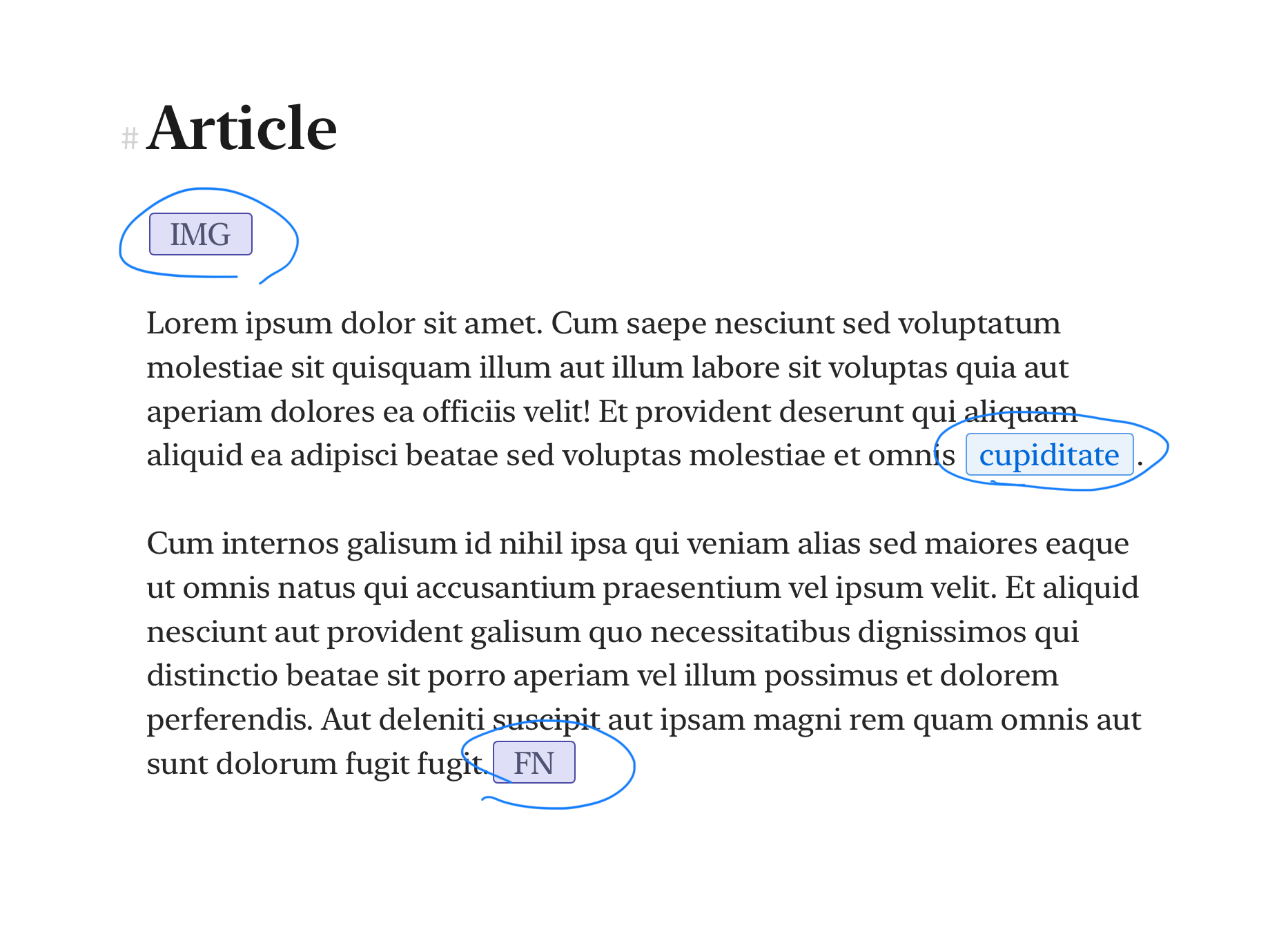
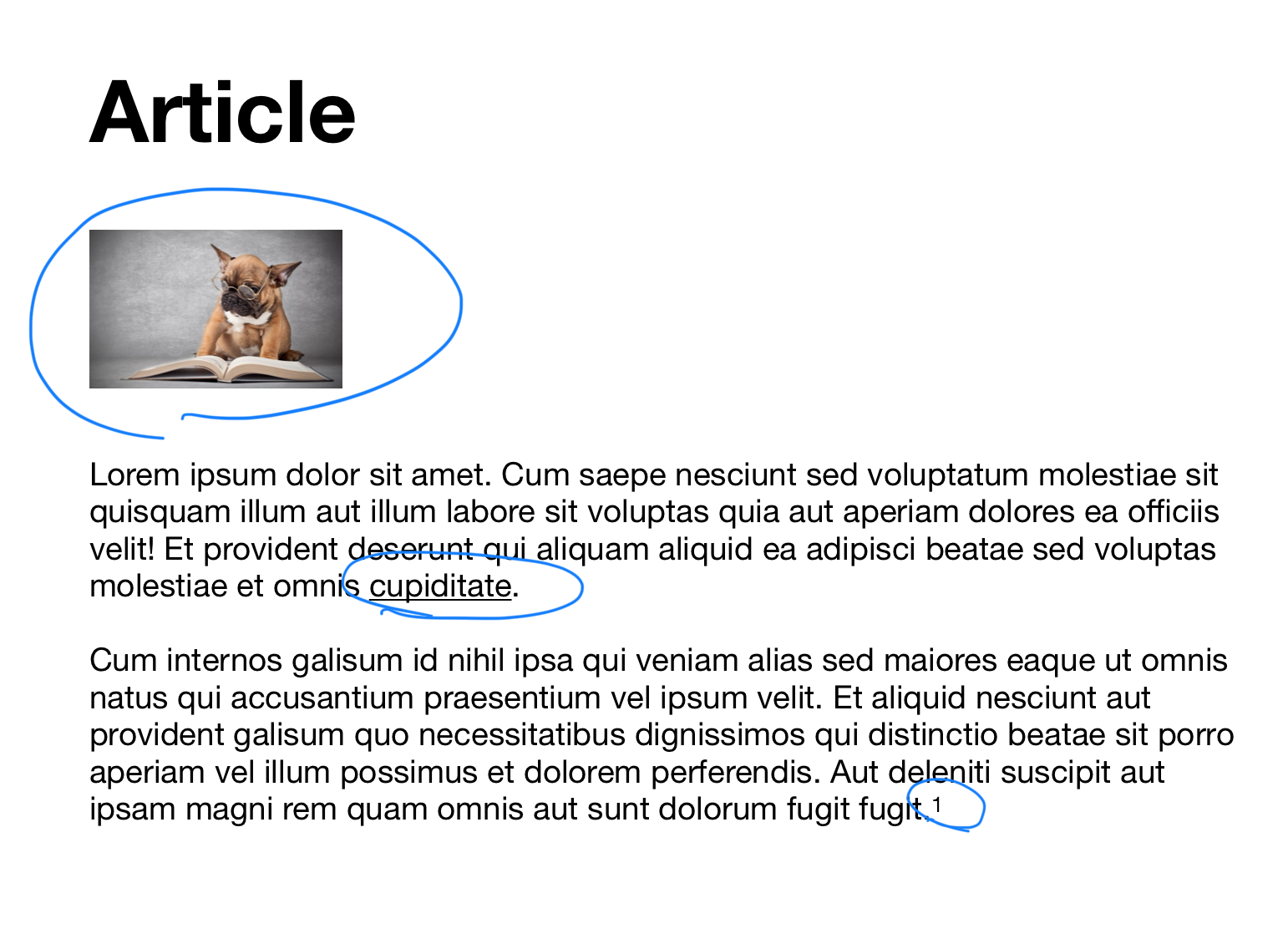
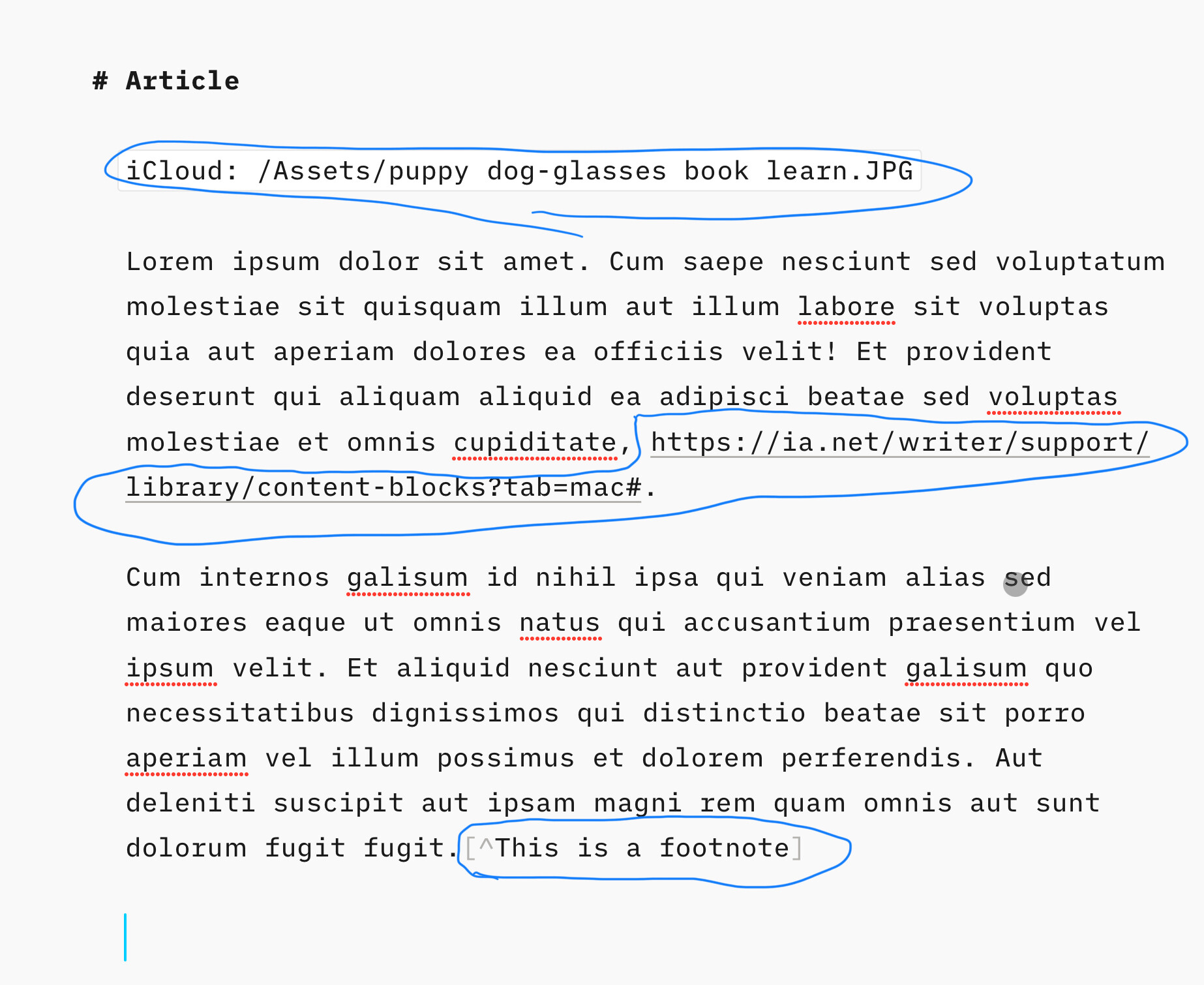
In principle, I prefer markdown. In practice, markdown in and of itself can add complexity and visual clutter. Visual clutter is the enemy of focus. Below are three screenshots of the writing environment using the same elements (Title, image, text, link, and footnote). I routinely use all five in the majority of my writing. One could argue, and I do, that the article in iA Writer is far more visually cluttered than in Ulysses and Pages. That clutter affects the flow of writing. Each of the apps requires the writer to use keyboard shortcuts, icons, or drag and drop to add the needed elements, so in that sense, they are “equal” in terms of what I’ll call “writing overhead,” i.e., the need to do something other than type text.

IA Writer

Ulysses

Pages

Focusing (pun intended :slightly_smiling_face:) exclusively on the visual presentation while writing and not other advantages or disadvantages of markdown vs. alternatives, Ulysses and Pages have less visual clutter. I can’t speak for others, but I can focus better on content and flow when there is less clutter.

Having said that, if one’s writing is almost entirely comprised of words with infrequent use of images, links, or footnotes, then markdown and apps like iA Writer are great. But, as one adds elements to the writing process, markdown loses its advantages unless those elements are hidden or minimized on the screen.

4 Likes

This has been an interesting thread. I like seeing the underlying markdown. It reminds me of the old Wordperfect reveal codes. I can see what is exactly behind the text. If I want non distracting markup, I will render the text. I really did not think the markup was distracting, but this must differ greatly with whomever is writing.ulysses is pretty, but it has nonstandard markdown which gets back to obfuscation.

1 Like

I’m glad I’m not a developer! Impossible to please everyone. :grinning:

I’ve enjoyed the discussion too.

In a business and especially corporate, context, Word can be every bit as focused as markdown. When you have to use a corporate template, with pre-defined styles, and often with standard paragraphs inserted, there is no distracting playing with formatting and with things like mail merge you can produce a lot of professional documents very quickly, with your attention on what needs to be said and how best to say it. It’s not so good for creative writing, though, unless you set up your own templates and make sure you stick to them.

I have very mixed feelings about markdown. It’s a great and simplified way to write text. It forces an important distinction between content and layout and formatting. It’s a disaster to read and, IMHO, it’s not half as universal or easy to process further (e.g. to publish) as is often claimed. I also think that there is a very good reason why we bother to format and layout text: there is meaning in it, as much as there is in the plain text itself. I very often hit problems taking a document from one markdown app to another and you are very quickly deep in the weeds when you want to export it as formatted text (e.g. as a pdf) that meets your needs. That’s because markdown isn’t really a standard and because its use has been stretched very far beyond its original intent (as an abbreviated and more human-readable step towards html)

I have iaWriter. It’s not my tool of choice, but I have always appreciated the depth of thought and great care behind the app and its approach.

Just a minor point of information: Ulysses can be set to several different “flavours” of markdown. The default is “non-standard”.

3 Likes

(I think it’s) because iA Writer encourages you to switch between writing and reading/preview (separate writing and reading? see MULTICHANNEL TEXT PROCESSING: THE BENEFITS OF USING MARKDOWN 4.1 Write And Preview):

Moving back and forth between steps in a process is necessary and refreshing. If you love to work in a WYSIWYG editor, or print your text from time to time, or regularly preview it on your blog before publishing, you already know: Definite formatting helps us to take the reader’s perspective on the text. Seeing our text printed out changes our perception of it. You get a similar effect when you swipe away from Markdown and look at your rendered text in HTML-preview.

If you want clutter free, on iA you will need to stop writing and preview: giving you fresh new perspectives and see if you need some better editing.

1 Like

Which of these does Markdown do? I wonder which of these most users use?

Let me give you a practical scenario:

Son: Dad I need to write an essay for school. What should I use?
Dad: Markdown the panacea of all writing.
Son: Thanks dad.
Son: I’ve finished writing, but need to underline a few things.
Dad: Sorry son, Markdown can’t do this.
Son: Dad how do I format it with the school font, font size and line spacing?
Dad: Sorry son, Markdown can’t do this either.
Son: Dad how do add a footer with the page number?
Dad: Sorry son, Markdown can’t do this.
Son: Dad, I’ve been told to put my references in footnotes, how do I do this?
Dad: Sorry son, Markdown can’t do this.
Son: Dad, I need the same header on each page how do I do this?
Dad: Sorry son Markdown can’t do this.
Son: Dad, I need to add some images and flow the text around the images and add a caption, how do I do this?
Dad: Sorry son, Markdown can’t do this.
Son: Dad, what’s the point of Markdown if it can’t be used for a simple school essay?
Dad: All the cool dudes use it, and you can still read your school essay in 300 years!
Son: Dad, my essay’s due in tomorrow, what should I do?
Dad: Use Microsoft Word.
Son: Thanks dad, you could have told me this in the first place.

2 Likes

As any good business analyst will tell you, the full requirements were not specified at the outset.

And without knowing the full requirements, it is not possible to select the correct tool.


We know you don’t like markdown nor understand why others do. And that’s ok. Different strokes for different folks. Stick to word. That’s fine. But continuing to claim that your use case is the only true use case gets old.

Cheers.

2 Likes