I purchased OO 6 on the Mac store and was able to install it on all iOS devices; they inherited the license.
2 Likes
Thank you for your reply and that all makes sense.
In general I prefer to purchase directly from the developer rather than the app store. So ideally I’d purchase OmniOutliner Pro from the Omni folks directly and “somehow” that would auto-link licences with the necessary App Store downloads of outliner for iPhone and iPad. But I can’t discern if that auto-link of licenses will happen if I purchase Outliner for the Mac directly from the good folks at OmniGroup.
1 Like
The universal licensing model is appealing and I just made the purchase. I’ve tried to love OO before and failed, so high hopes for 006 especially after reading this thread!
I posted this in another thread, it may be helpful to you.
2 Likes
I purchased my copy directly from the Omni Grouo and received a license for OmniOutliner. You can add this license to your Omni Account. When you install the iPad version from the App Store, it runs as a trial version until you log into your Omni account. Once you do that, the software recognizes your license, and you will be running the fully registered software.
5 Likes
Another reason OO is working well for me is because it works with outline documents, not an internal database.
Yesterday, I started a second OO file for a thing I’m writing. The first one is my outline, on the second I enabled checkboxes. It’s my to-do list for just this writing project, not an outline.
There are times I want to keep a project’s tasks separate from the many headed beasts in my personal task lists. I don’t need a full fledged task manager for such things. OO is great. Almost every to-do manager out there uses one internal database for everything.
Besides, I hear OmniFocus started as OmniOutliner javascripts.
4 Likes
Thanks so much for this reply! I figured it had to work but wanted to be 100% sure before purchasing directly.
1 Like
Still can’t change Sidebar font size 
Just out of curiosity, does it respond to the systemwide font size in Settings > Accessibility > Text size?
Pardon me for asking a dumb question. I’ve had OO since 2010 or thereabouts. I was looking through the features on the website. What new features did OO6 actually get?
There are updates to the aesthetics, consistent with the new Mac/iOS. Omni Links - deep links within documents are supported. The Mac version allows multi-window view of a document. iOS/iPad support filters. Automations can use Apple AI model. Also icon refreshed with Halloween colors.
1 Like
I’ve been using the app for the past week as the older versions where part of my daily workflow.
I like the app in general, but formatting still carries a lot of friction, especially with document vs row vs import. The import has been especially annoying with “Paste and Match Style” often not working. I wonder if this is to do with some of way it embeds styles? Ironically if I paste from a styled OO6 doc to a blank OO6 doc it invariably brings the style; often the background with it, even when set to paste and match style. (I have notified Omni) I am getting some visual anomalies, which clear when the app is closed and re-opened so I imagine there are still some bugs to fix. I’ve also had one crash when trying to save an OO created OPML as an OO doc.
Having said that, they’ve done a good job with their baked in colors working well in both light and dark mode. The only thing you can’t alter is the black to white text. It’s also a snappy app and works well across platforms. I especially like the ability to remove indentation when on my iPhone.
I think long term creating your own specific light and dark templates separately is going to be the way to go.
I’m surprised how important the light and dark themes are to me now, whereas five years ago I didn’t really care.
1 Like
When you say you can’t alter the black to white text, which text specifically are you referring to? I’m working on a video of OO6 at the moment - so have seen that if you go to the Inspector - click on Document - if you click on Options below Dynamic Theme, it let’s you swap the palette and this switches the black to white text. Or are you referring to something else?
Sorry, I should have been clearer. For a dynamic template where the colours change between light and dark themes along with the system light/dark skin, it currently only works with black and white text. If you wanted an off white colour (which I prefer as white creates too much of a contrast) the text colour then becomes static and is the same on light or dark theme.
If you’re working on a video have a look at the bugs in the colours. If for example you change the background color it automatically seems to change the text colour. I’m also finding that if I leave the document open unsaved for long it tells me it’s been saved from another location when this is the only doc open. I’m wondering if this is an iCloud issue. All told, this is quite a buggy app for me.
A-ha - I see! So - my results on that one are slightly different. Each font colour I set, in Dark mode, dynamically changes in light mode. So a couple of examples - an off-white colour in Dark Mode (Mercury - you can see the names in the Style Attribute within the Inspector) changes to an almost black colour called Cool Shale. A light green in Dark (Mild Flora) became something Clover in Light Mode. So I’m not seeing the bug you are.
Same for the background colour - I’m not seeing it change the text colour. The only bug I’ve seen is when I go to look at the Connected Folder ID and if I try to change it, it crashes. Other than that it’s been pretty sound so I guess I’m lucky.
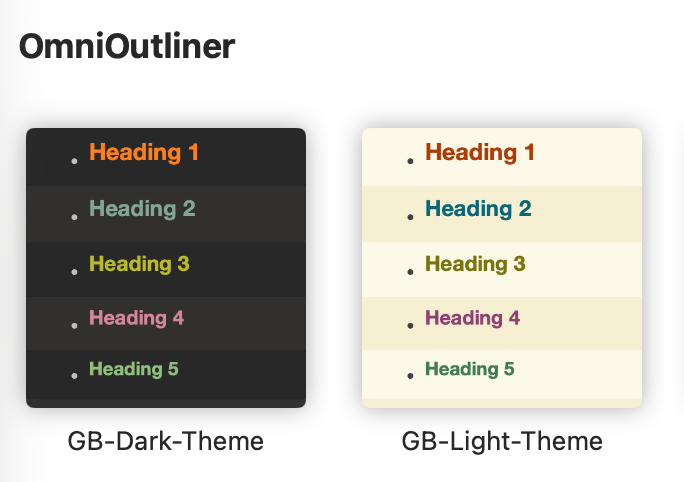
I’ve created 2 templates; one light and one dark (based on GruvBox) as I find the standard colours too muted. I also tried a template using the developer palette which allows you to select OS colours where the OS will switch light and dark and that worked a bit better, but all of these were a bit limited.
I’ve only found glitches as I’ve been developing templates. If I use the default template with no changes all is well.
I really do like the app though. I’m an outliner at heart and this really fits the bill. Now I’ve created my two themes I should be set really.
3 Likes
Styles in OO are complicated by the need to alter style as row level changes. Unindent something at level 5 back to level 1, and its style will follow the level style.
Text columns are kind of a quirk. I’ve found it best to set the font size in whole document and leave the fonts alone in the various levels.
Count me in a still-learning phase. I find things that work and get a little lazy.
So I’ve used my trial period and do like the app. However, I am finding there’s a fair amount of friction in daily use.
I’m an avid user of Craft (no friction for daily use). Is there anything OO6 gives me over Craft (apart from local docs)? I’m failing to see why I should upgrade.
I see Craft and OO as distinct apps for different purposes. I use OO to outline my work. I use writing apps to write from that outline. I don’t use Craft but I do use OO to create a markdown outline that I export to iA Writer.
1 Like
This is actually quicker in Craft as it is a Markdown enabled app.