You could do something similar in Notion if you wanted. I don’t find Notion great at managing tasks but this layout is possible and might work for what you need.
This is a basic database with a Board view Grouped by priority and then a sub group on Project. You could further filter to only show tasks with today’s date or other criteria.
Task managers like Omni, todoist, TickTick, are too constrained for a lot of my projects (lots of entrepreneurial visioning, big picture stuff, very little widget cranking), and “notes” apps like Obsidian are missing the databases features that i absolutely need to highlight my few great ideas in a sea of bad ones.
If notion is like Airtable + Evernote, that sounds ideal. Looks like Notion is pretty much alone in that space too (I tried clickup, too confusing, buggy and slow). hopefully this is an-app switch that is more fruitful than my bi-annual tradition: “export everything out (and later back in) to omnifocus”
Will keep using omnifocus for quick capture though
You and @pantulis have convinced me to make a switch today from Todoist to Amazing Marvin. I just love how customisable it is: I don’t like labels, so I just turned the function off and -poof!- they’re gone! I also love that it has an imports function! It took me 30 seconds to switch from Todoist to Marvin.
To give the free 30 day trial a proper test, I’ve also switched my Zapier integrations to Marvin so it gets a proper workout.
Now to see if Marvin can rescue me from to-do list bankruptcy….
Hope you enjoy AM! Mind you it is a very powerful and deep tool, and you can spend quite a lot of time fiddling with all the different workflows you can set up. Also relevant to MPU demographic: it is not a mac-assed app and it specially shows on the mobile app.
Apart from that, I firmly believe AM can accomodate any type of workflow you can come up with. I find specially powerful its 2-way Google Calendar integration that you can setup for as many Google Accounts you need.
I’ve landed on GoodTask—not for the first time!—but I am liking it this time. Only been about 24 hours or so. Ask me about it again in a week or a month.
Amazing Marvin looks, well, amazing, but pricey.
I’m intrigued by their having THREE dates you can attach to a task—start/defer dates and due dates, which I’m familiar with from OmniFocus and Things, and also something called “do” dates. The date you plan on actually doing something. I don’t know how useful that would be for me, personally, but like I said it’s intriguing!
The price makes me wince too. My main objection to Todoist is the subscription, and AM is double that! But it looked like such a good app that I thought I’d give it a go, and then I can decide if the price tag is worth it. If it drags my to-do list into shape I will perhaps find a way to stomach it. (I did not very convincingly tell myself its annual cost is less than two premium video games, and isn’t it better value for money… I don’t think my brain agrees!)
AM is chock full of these complexities, given its purposed nature of being the last productivity tool you would need. But most of this stuff can be ignored by disabling a particular “Strategy”, so my suggestion to any budding marvinauts is to begin simple and start building as need arises, otherwise you can get easily lost with lots of options, fields and whatnot that don’t deliver any value.
I don’t use AM, but my assumption is that the defer dates work like OF’s (you see them and then they’re gone). Do dates are for the day you plan to work on it (Today in Things). And due dates are, you know.
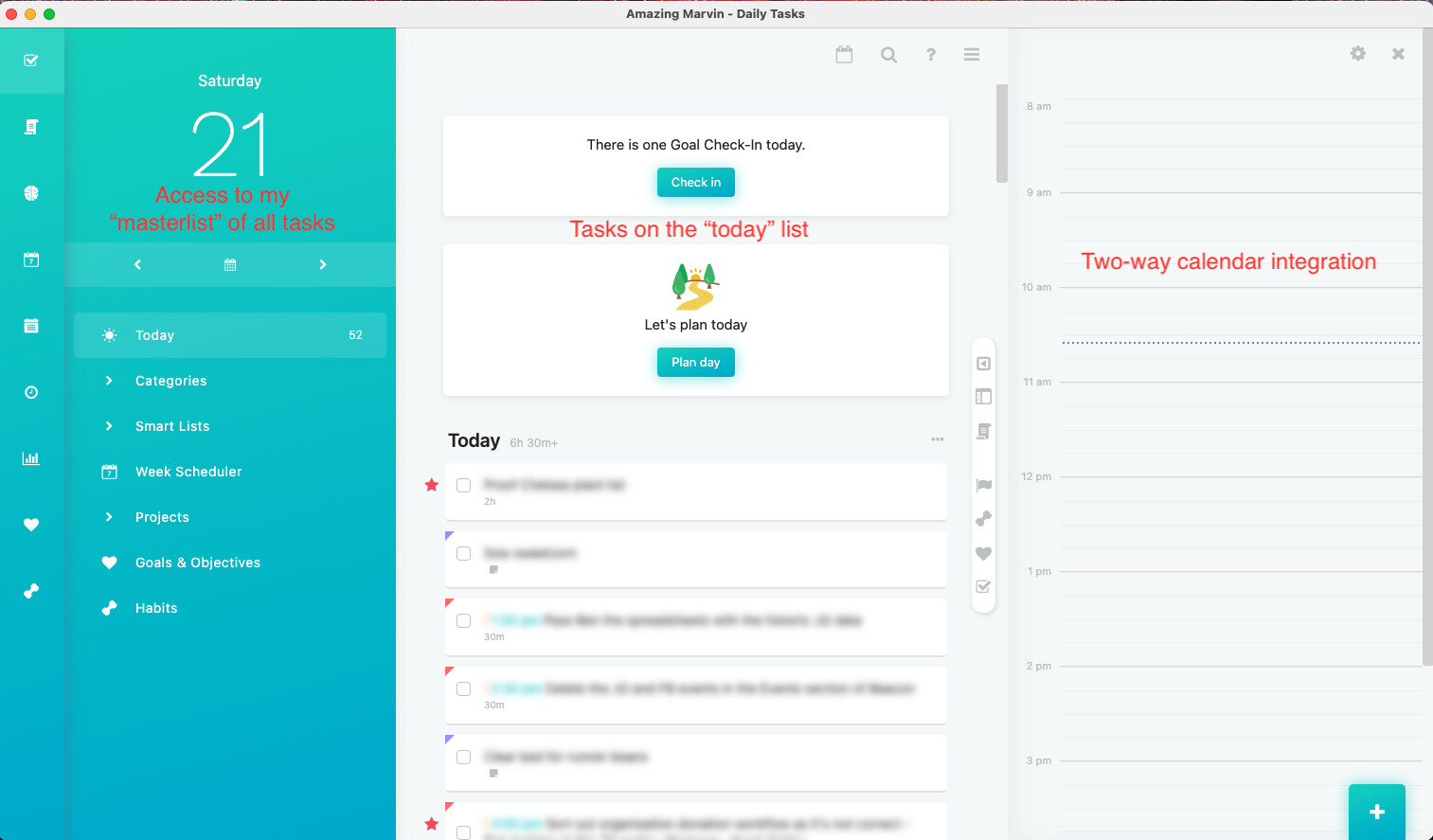
My first day with Marvin was excellent, so I thought I’d mention it. The 30 day trial is free and perhaps worth it even if you don’t plan to commit to Marvin just because it has so many features and you can see how you like to work. For me, I’ve discovered that a 3 column set up with:
all tasks
today’s scheduled tasks
day time calendar view (called “agenda” on Marvin)
Is apparently my sweet spot. I dragged tasks into my agenda, gave them an estimated time of completion, and away I went. It was awesome!
And, two-way calendar integration! I’ve turned it on so that my Apple calendar also shows all the tasks I’ve planned into my day. It’s helpful to see on my phone when I’m not at my desk.
The experiment continues, but I know now I definitely want a task manager that allows a daily plan to be scheduled.
I recently switched from Things to Reminders. I found that in some ways Reminders is more powerful than Things especially when you hook Reminders up with GoodTask.
Please can I ask you knowledgeable folk: this is my new setup in Marvin and I love it. There are 3 panels: on the left is access to any of my “project lists” or my “masterlist”. In the middle is all tasks that have a due/start date of today, and then on the right (the killer feature!) is a hourly view of today’s calendar. This shows any events already scheduled in my calendar (blank today because it’s Saturday). Marvin allows you to drag and drop tasks from either of the two lists and put them in your calendar. You can then size the item to indicate the amount of time you’d like to work on it. AND this then syncs to iCal/Gcal so you can see it as a task in your calendar.
Do any of the other productivity apps mentioned here have a similar view/feature? I’ve only used Todoist, which does not. I’ve tested Reminders and it can do this: you can have Reminders and iCal open in parallel and you can drag items from Reminders into time slots in your day view.
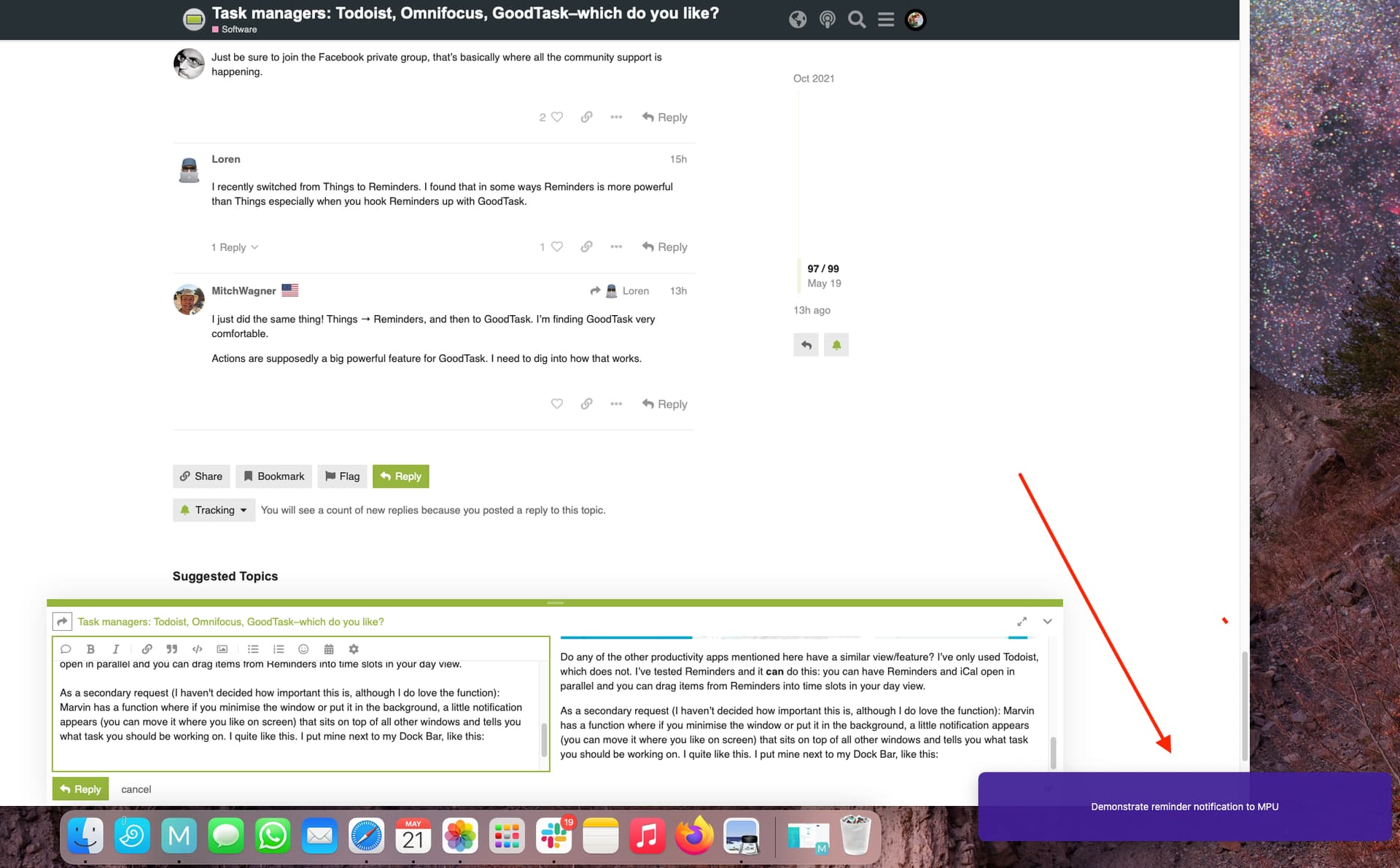
As a secondary request (I haven’t decided how important this is, although I do love the function): Marvin has a function where if you minimise the Marvin window or put it in the background, a little notification appears (you can move it where you like on screen) that sits on top of all other windows and tells you what task you should be working on. I quite like this. I put mine next to my Dock Bar, like this:
Marvin doesn’t have feature parity across devices and my experiments the last couple of days on iPad have not been enjoyable, the web version crashes Safari, so it seems only really useable in the iPhone app and on a Mac (the iPhone app is quite stripped down and I don’t like it much).
Before I switched to Amazing Marvin last November I had Omnifocus and Fantastical running in split screen next to each other on my iPad, dragging Omnifocus tasks to my calendar (time blocking strategy at start of each day). Nowadays I use Amazing Marvin mainly via the Mac app or web browser for best experience and the iPhone App mainly for quick entry and for checking off tasks on the go. Full feature parity between the iOS and the desktop/web version would be truly awesome but the current versions are still better for me than any previous alternative.
By the way, does any of the beta testers happen to know or be comfortable to speculate on when Omnifocus 4 will be released and whether similar features will be available?
There’s no announced release date for OF4 (it’s not in beta yet, just early testing for the iOS/iPadOS verions) and I don’t believe it will have integrated time-blocking.
Thank you for your reply. OF looks like it would easily distract me (I can see myself getting sidetracked optimising stuff in it!) but it’s interesting that it allowed drag and drop from its app to a third party calendar (I do like apps that play nicely together).
Amazing Marvin is… amazing, but I can see that it perhaps needs a bigger team behind it to roll out some of the functions entitled users like me expect nowdays I didn’t even know how often I liked to check to-do lists on my iPad until I tried Marvin and couldn’t do this easily. I know some don’t like Todoist because it doesn’t have a native Mac app, but one great thing about it is feature parity across devices. Sadly for me it’s just turned into a black hole for tasks with no easy way for me to visual and plan them.
Your comment on OF and Fantastical made me wonder about Todoist and iCal on the ipad, and they have the same function! In split screen you can drag items from Todoist into iCal and set them up as events!
You might like an app called Minus. There is a Taskbar feature that helps you remember what you are working on. It reads from the top of your favorite todo list/app.
I used Omnifocus for years on my Mac, iPad and iPhone. I always found it overkill for my needs. When OF switched to a subscription model, I sought out a replacements. I settled on Things3. It works for me, simpler and prettier than OF.
Cheers,
Bud
To set the record straight, OmniFocus hasn’t switched to a subscription model. While OmniFocus can be purchased on a subscription basis, you don’t need to subscribe to OmniFocus to use the Mac and iPhone/iPad versions. The exception is OmniFocus for the Web. It’s only available on a subscription basis.
On a side note, the Omni Group shared that OmniFocus 4 will be a Universal product. You’ll be able to purchase a license that allows you to use OmniFocus on the iPhone, iPad, and Mac. Currently, the iPhone/iPad and Mac versions of OmniFocus are sold separately.

 I didn’t even know how often I liked to check to-do lists on my iPad until I tried Marvin and couldn’t do this easily. I know some don’t like Todoist because it doesn’t have a native Mac app, but one great thing about it is feature parity across devices. Sadly for me it’s just turned into a black hole for tasks with no easy way for me to visual and plan them.