The customizable Control Center in macOS Tahoe is a huge upgrade. I’m up to 3 separate ones now (two just for Shortcuts)
1 Like
I also stopped using a menu bar manager after I upgraded to Tahoe. But as a 13 inch MacBook user, I have to prune my menu bar quite agressively. After watching the last show, I installed Barbee. But not only the app asks for a lot of permissions, but it asks you to install an extra helper app. The thing makes me nervous. Also, it doesn’t play nice with the Supercharge app. I will probably uninstall it and ask for a refund. I keep forgetting about Control Center, so thanks for bringing it up. It could do the trick.
If you are a CleanShots and Alfred user, checkout the Cleanshots Alfred Workflow. It is a game changer!
2 Likes
I did not realize development of Ice had stalled. I’'m glad I thaw the news here.
5 Likes
This seems like as good a place as any to share something I’ve noticed about my menu bar app choices that humors me.
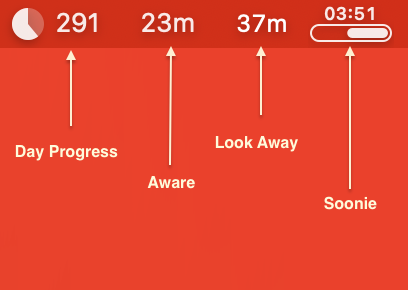
I guess I have some kind of meta-interest in how much time I spend at a computer. I’ve been using RescueTime for well over a decade (also in the menu bar, not pictured) but over the years I’ve accumulated the following timer apps that I just keep in my menu bar.
- Day Progress - Shows how much time is left in my workday.
- Aware - Just a timer showing how long I’ve been looking at the screen without a 90 second break.
- Look Away - My most recent addition; really well thought out app that actively helps me take breaks. Really sensible defaults but also really customizable to how you work, I’m a big fan.
- Soonie app - Handy little view into what’s next on my calendar.
1 Like
+1 that Bartender 6 is still a great utility with frequent updates.
I tried Ice also not using a menu bar manager at all. When the dust settled , I returned to Bartender .
It does have its moments which I why I appreciate the frequent updates. Hopefully this will stabilize…until the next release of macOS