Apple Music playlist is driving me crazy. Please help me from completely losing my mind

I’ve been going around in circles with Apple Music. I have a family subscription, and I have many hundreds of CDs imported to my laptop. I’m running Ventura 13.6.3 on an M1 MBP, and 17.3.1 on an SE3 iPhone.

  • I have copied no songs to the phone from the Mac.
  • On the phone, I have Cellular Data on, Sync Library on, Add Playlist Songs on.
  • On the Mac, I have Sync Library on, and “Add songs to library when adding to playlists” is checked.

Ok, now that’s out of the way. I make playlists on my phone, and I may have made some on the Mac too, but it has been a while. I used to make them from my personal library, but that seemed to cause some interference with the Music subscription function, so I now only make my playlists from AM. I may search out a particular song and add it to a playlist, or sometimes AM suggests a song for me, and I like it enough to add to a playlist. This only works sometimes. I can play a song and then add it to a playlist. It will always show up on the list, but may or may not be grayed out. There appears to be no rhyme or reason to the grayed out status. These are all common songs. Some already exist in my library, some do not. That has no bearing on whether or not the song gets grayed out.

When I tap the grayed song title, I get the entirely unhelpful message, “This song is not synced across your devices. On your Mac or PC, go to Apple Music or iTunes for Windows and in Settings, select Sync library.” I’ve already done that.

In a very nonintuitive procedure, I’ll plug in my phone to the Mac, navigate to it in Finder, and choose Sync. After an excruciatingly long back up time (regardless of how recently I last backed up) the playlists on my phone remain unchanged. The playlists are all fully functional on the Mac.

To further complicate matters, I cannot use some of the songs in my playlists for karaoke night. Again, for no rhyme or reason and for not obscure songs, the display lyric function will not work for some songs that are in the playlist. The lyric button works no problem if I delete the song from the playlist, then search for it in AM.

I unsynced the other day and resynced later, which for whatever reason took forever. This made no difference to the ongoing difficulty with playlists.
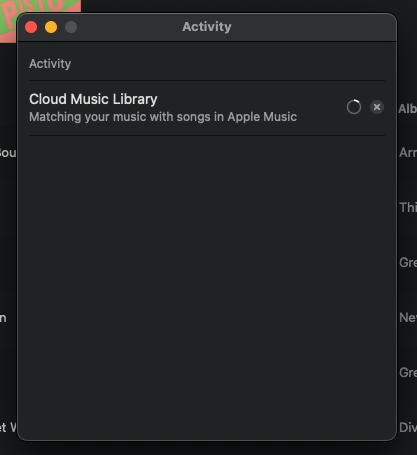
Screenshot 2024-05-19 at 7.30.52 PM

My internet searches have prompted many other troubleshooting actions, and led me down numerous fruitless rabbit holes, and the Apple help pages have been utterly unhelpful. Short of nuking and paving my whole Apple ecosystem, is there any decent way to get these Music issues under control?
Problems like this are why I stopped using iTunes/Music like I used to and just subscribe to Apple Music and stream it instead. I’m not sure I have any solutions, but:

When you look in the Apple Music app on your Mac, what is the cloud status of the songs in your library? Are they all matched?

Also from the link above, a grayed out song seems to indicate that the program thinks it’s either not allowed to play that song or it’s no longer in the Apple Music catalog. Since you’ve probably already checked to make sure that you’re using the same Apple IDs to access music on these 2 devices (and the Mac is probably authorized), I’m thinking that the music database has become corrupted and is causing these random-seeming errors.

I took a look at my library, and I’ve got a handful of grayed-out songs that are “No Longer Available”. And I found three grayed-out songs whose status is “Apple Music” and it has the dotted cloud icon next to it — but I can’t interact with it at all. I searched for the artist in the Music app on my iPhone, and the songs are no longer there.

I also have a lot of albums whose cloud status is simply blank. They are playable, but that seems to indicate some serious problems with my library — or with the Apple Music catalog?

1 Like

Thanks for your detailed thoughts on this matter. Looking at the Mac app, I’m not sure where I can see the “cloud status” in the song list, etc. I can see the icon on the phone app though. All the songs on the Mac app have the same icons, including the songs that are grayed out on the phone. I previously eliminated the “not allowed” idea since I see songs from the same album having different status on the phone. Where should I be seeing this cloud status property? That may be key to solving this issue.

Again, none of these songs/artists/albums are obscure or rare. Looking right now, one grayed song is from Jane’s Addiction on the platinum “Ritual…” album - very much an available and allowed song. This song is also ripped to my Music library.

I suppose that I could offload the music library temporarily and have the Mac think that my library is empty, although I don’t know how to clear out the “cloud status” which may also be a problem.

It took me a while to figure out how to see the Cloud Status of items in my Mac’s music library.

First, it appears that it is only available when looking at the Songs list. Second, if you don’t see it as one of the column headings, you need to turn that on. You can do this by editing the list of columns — Control-click on any of the column headings and you should see a pop-up list with checkmarks to turn their view on or off. I suggested taking a look at this so you can tell the difference between what your Mac’s library thinks is happening and what should be happening. The Mac’s library is important because that’s how the imported music got matched with Apple’s music catalog.

As for how to go about wiping out your music library and starting over, it’s trivial to create a new empty library and force Music.app to use it. However, with an Apple Music subscription, I think the cloud library will just be downloaded to fill it up, likely bringing along all of its problems. But it’s’ probably worth a try!

If you do want to completely start over, you will likely need to contact Apple’s tech support and get them to completely delete your cloud library. I’ve had to do similar things for my clients whose data became corrupted and the cloud syncing kept poisoning any fixes I tried.

1 Like

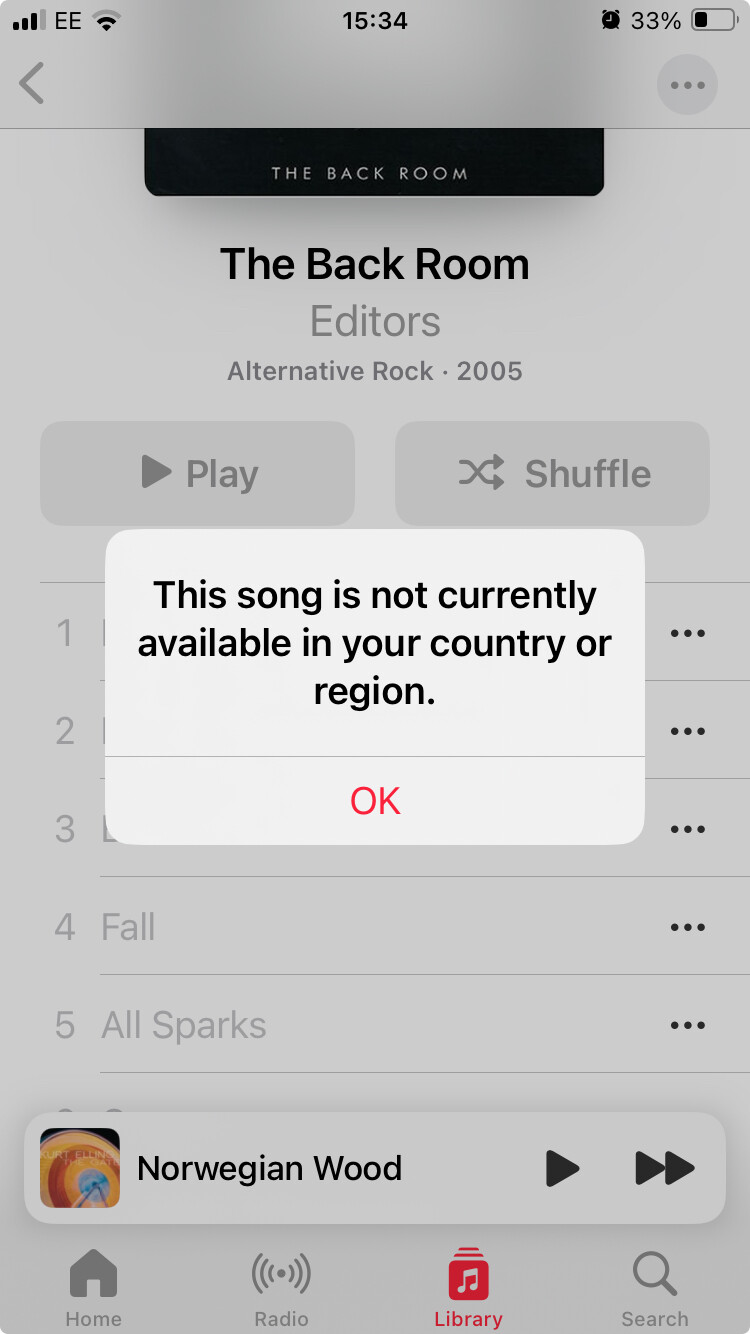
Perhaps a related issue: I’ve basically declared bankruptcy on my short-lived attempt to understand iTunes Match, which I paid for recently without being an Apple Music subscriber. It took a LONG time uploading my 100GB or so of library (years and years worth of MP3s from many sources, mostly ripped CDs that I own(ed) or borrowed from friends). I had hoped to be able to stream the lot from my iPhone when out and about. When this had finally all uploaded, for a fair chunk of my content I see this:

It’s really frustrating and my limited troubleshooting led nowhere.

So I am back on Spotify which I do not enjoy, streaming a parallel collection of music rather than my older library.

Hmm, I’ve not had any sync problems across my three devices in the years I’ve been using Apple Music (I’m beginning to think I might be an anomaly).

Are any of your devices on a different network or vpn? And do you have private relay turned on on the iPhone? I’m just wondering if that is causing a mysterious problem (though I am running VPNs on all devices without it affecting Apple Music).

I don’t know if booting in safe mode on your Mac would allow you to test Apple Music, though might be worth trying just to see. If the sync works in safe mode, you’ll know it’s a problem with your Mac user profile not your Apple account or your phone.

1 Like

That sounds like a nightmare, @SebMacV. I don’t blame you for switching services.

I was looking through my iTunes/Music bookmarks, and I found this discussion on Reddit:

https://www.reddit.com/r/AppleMusic/comments/yms7vf/this_song_is_not_currently_available_in_your/

That discussion includes this quote: “I talked to Apple support more yesterday and we’re definitely in a we’re screwed position. For whatever reason which they can’t really explain, the matches that get imported in to iTunes directly from your computer sometimes gets corrupted.”

I can see why Apple doesn’t mention matching tracks on any of its promotional stuff about Apple Music! I wonder if they even have anyone working on this at all.

1 Like

Wow. So what I’m kind of picking up here (and elsewhere) is that Music app is just buggy, underdeveloped, and/or overcomplicated to the point that it “just might not work.” And we probably can’t do anything about it. My internal troubleshooter however can’t help but try to find the incorrect setting or bad data, etc. in the system and fix it, because I’ve learned for the most part that I can rely on the Apple system itself to be good.

It seems I might need to disabuse myself of that thinking.

I think the specific problem is with the matching service. That’s what I hear about. Of course, people with extensive music collections/playlists probably care a lot about them, so those are also the people who are more likely to notice and complain about issues! So that my be warping my perception.

When iTunes royally screwed up my library years ago, I realized I had two options: look for a different service or give up heavy management. I chose the latter. But that’s just me. :wink: