Disable "Revert Changes"

One thing that it’s a bit “annoying” is this feature that we can’t seem to disable (at least not that I’m aware of) which is the way documents seem to save different versions.

I like it when apps just ask me, when the document has changes, if I want to save it or just don’t save it.
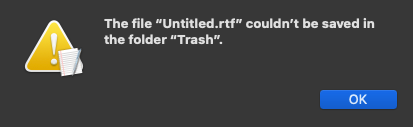
Here’s the issue with the “Revert Changes” thing: if I delete that document from Finder before closing it (for example in TextEdit), now I get this error message and the only way to fix it is to either move the file from the Trash back to its original folder or force quit TextEdit.
image

Sometimes I get other errors with some really weird messages.
So I end up in this loop where I can’t close the document and I don’t want to save it.

Any solution for this?

I know that we have this feature in System Preference to “Ask to keep changes when closing documents”

And I still want to be asked if I want to save changes. I don’t want it to close the document with the changes. To be honest, I don’t even know who came up with this idea that we might want to always save the document with the changes without being asked what to do… is this a popular “request”? It seems weird to me.

This seems like a simple problem, but I think it is actually quite complex. You’re talking about how the operating system handles files that are in a “temporary” state (where the user or the program can change the contents of that unsaved file at any moment in an unpredictable way).

By looking at the set of commands in each program, it’s possible to see that programs handle this state differently. Therefore, I don’t think there could be a global setting that allows the user to change this.

But then, I’m old enough to remember when Microsoft Word first added “auto-save”. It was a wonderful invention, designed to allow us to stop compulsively hitting Command-S to hopefully save the document before Word crashed or hung (though, to be honest, I have never stopped reflexively typing Command-S every time I pause when writing).

So to answer your question, it was a popular request; or, at least it was a popular feature.

Computing was more fragile then, so moving a file to the trash while it was still open was guaranteed to cause problems for every program. (And possibly fatal ones, meaning data loss.).

And you can see echoes of this today — programs don’t have a menu command to “move the currently open file to Trash”. (But when I think about it, this would be very handy when cleaning out files. Most of the time I can use QuickLook in the Finder to see the file contents in order to decide if it should be deleted, but sometimes I need to open it.)

The same situation exists for renaming files. We didn’t dare rename a file in the Finder when it was open in a program. Now you can reliably do this — with some programs. Text Edit handles it just fine. But only yesterday I was reminded that Adobe Illustrator doesn’t; I ended up with 2 files, not knowing for sure which ones had the final changes I needed. That’s better than overwriting the wrong changes, but it wasn’t very graceful.

All of which is to say that I don’t think there’s a way to do exactly what you want, but perhaps someone else (someone younger?) can suggest a workflow that will get you what you need.

2 Likes

I believe all of this came about with OS X Lion. Its always been the case that apps that are database-centric, such as Calendar, Mail, iPhoto/Photos, automatically saved as they ran, and opening those apps would resume where you left them off. Prior to Lion, apps that were more like editors, such as Pages, Numbers, Keynote, TextEdit, were app-centric. You would open the app which could edit those documents and only save them by request or when prompted when closing the app. When you opened the app you basically faced a blank screen until you opened a document.

Lion introduced a document-centric approach. The document would save itself and whatever you were working on when closing the app or shutting down the computer would be back when you reopened the app or logged back in. Save was basically an unnecessary command, as well as Save As. Now you would Duplicate the document (instead of Save As) to create versions. Built in versioning allowed going back to previous states.

The problem was that most people hated this change. Apple backtracked and basically allowed Save As again. Many/most 3rd party apps never even adopted the document-centric approach. So now we have a mess!

I wrote all about this back when Lion came out. See OS X Lion

2 Likes