Perhaps a travel dongle for you in case you have anything that doesn’t connect via USB-C. Anker makes great products for this. Otherwise I use a hard-shell case on my 14" MBP, and a good backpack with padded sleeve. I like to have everything in place on my desk(s) – work and home – so when I move between home and office or for travel/research, I have a ready to go tech bag of cables.
A final accessory that comes with me anywhere I need to do some sustained work: light-weight riser. It will save you your neck and back! But you can’t use it unless you take a travel keyboard and mouse. Your mileage will vary!
I’m not sure what benefit a screen protector would be for a laptop. I may be lucky, but I’ve never damaged a laptop screen. If you think about it, when you’re not using it the screen on a MacBook is sandwiched between two sheets of aluminum. The only way that screen is getting damaged is if the laptop takes some significant damage, or if something manages to hit it while you’re actually working on it.
I don’t use one either. Be careful about closing your MacBook with anything in between. The tolerances on modern MacBooks are extremely tight. A webcam cover, for example, can crack your screen.
Some years ago, I knocked an iPad off a shelf above my desk and put a distressingly large scratch in the screen of my MacBook sitting below. However, I still don’t use a screen protector. But I did take the shelf down and never set anything higher than the devices on my desk.
Couple more ideas from someone who has had a laptop for personal use (and sometimes work) since the 1990s.
Will your dock provide power for the laptop? If not, you might want to consider getting a second charger so one can live in the laptop bag and not have to worry about wrapping up the one from your home office. I particularly like my Anker one because it is smaller than the Apple original one and it has a second USB-C port and a USB-A port so I can charge additional items when I’m traveling (I’ve got a MacBook Air, so the model I have won’t work for your MacBook Pro, but Anker should have on that works).
They aren’t nearly as good as desktop ones, but I would buy a travel surge suppressor to make sure your computer doesn’t get fried on a laptop when you are away from the house. Mine is whatever Wirecutter was recommending at the time a few years ago. Please note that travel surge suppressors don’t switch from North American 110 volt to 220 volt, so you will kill a North American one if you plug it into a plug adapter In a lot of Europe and Asia.
If you are concerned about people reading over your shoulder when you are out and about, you should look into one of the privacy filters that you can stick over your laptop screen. The magnetic ones built for a Mac are preferable as they are easy to snap on and off when you don’t need one.
Software wise - the two that leap to mind immediately that you wouldn’t have need for with a desktop are a good VPN client for use on strange wi-fi and Amphetamine to allow you to keep the computer from going to sleep when you don’t want it to.
If your current backup system is based solely on a physical hard drive, you might want to look into Backblaze so that you data is getting backed up away from home.
If you plan on going on a trip with your MBP using hotspot. I highly suggest Tripmode. It can monitor or suspend any network traffic to save your limited data. Also useful when you want to prevent data-hogging activities when you’re connected to a slow network. I use this when I want to prioritize some heavy download/upload when I’m outside.
It also saved me when I was outside the country with just 5GB of data. iTunes keep on downloading my decade old Monster’s Inc purchase. Had to stop it from downloading or else I’m out of $15 worth of data.
On both my desks I have this sort of stand to bring the MBP to eye height. The travel one I linked to above is what goes in my backpack for any writing/research sessions over an hour or so, typically in my job to academic libraries, archives, and so on.
Enjoy your MBP I am sure you’ll love it. It sounds like you’ve got quite the shopping list from this thread … obviously experience will dictate what you’ll need/want, and what you don’t.
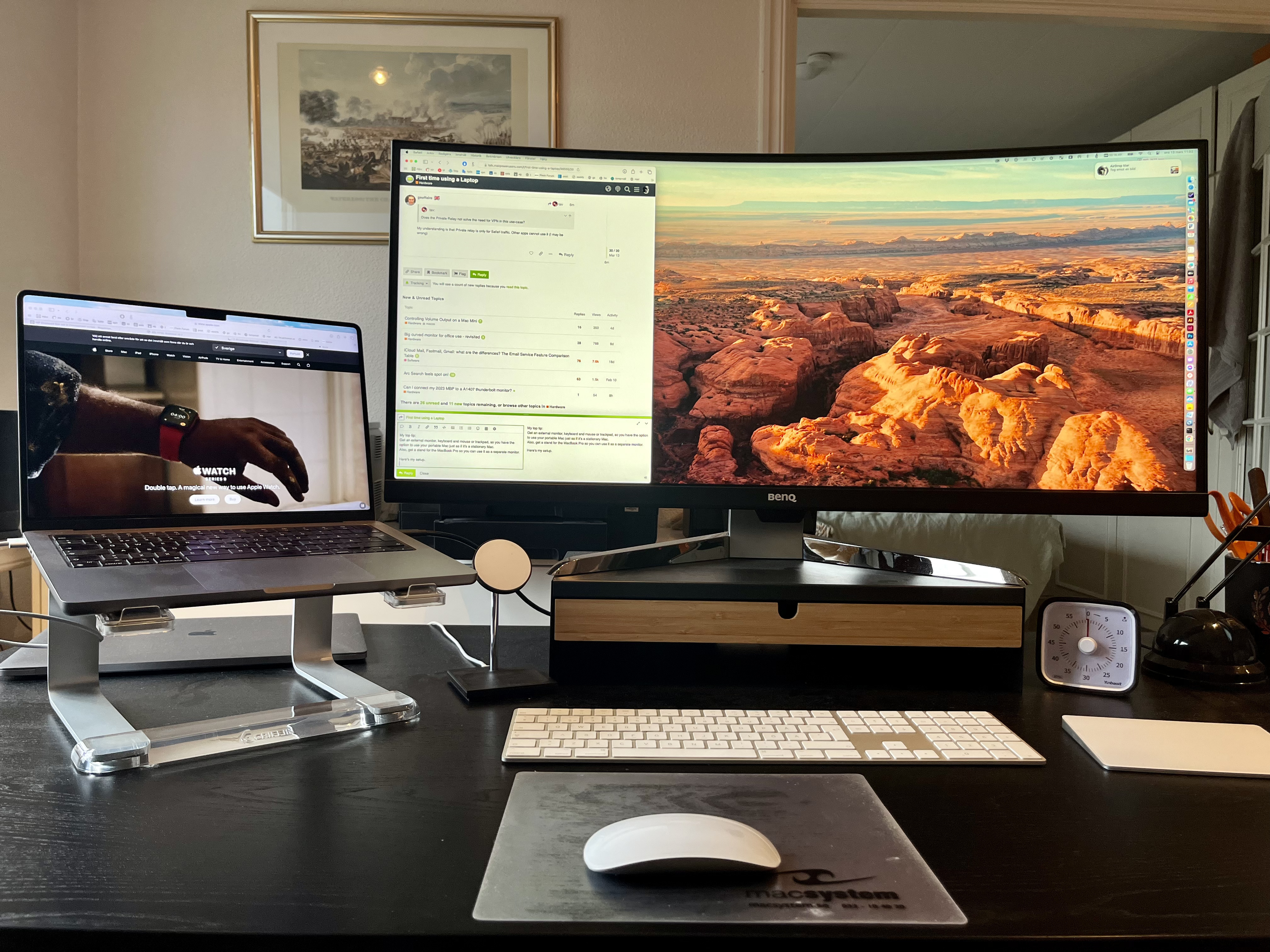
My top tip:
Get an external monitor, keyboard and mouse or trackpad, so you have the option to use your portable Mac just as if it’s a stationary Mac.
Also, get a stand for the MacBook Pro so you can use it as a separate monitor.
That’s how I use my MBP14" most of the time, but I also have the option to bring it with me, which is the beauty of it.
Here’s my setup (35" widescreen Benq, Magic keyboard, mouse and trackpad):
Here’s an intriguing item: A combined portable stand and external keyboard for your MacBook, to use in hotel rooms, coffee shops, wherever:
I’d also suggest looking into some of the lightweight, portable external displays on the market now, or using an iPad as an external display using Sidecar.
I’ve never used a screen protector for a MBP and as others have said I’d be concerned about damage when closing the lid given Apple’s meticulous attention to detail.
For what it’s worth, I’ve dropped two MBPs down carpeted stairs over the years (by accident!) and both survived - one didn’t even have a mark on it, the other (my current device) got a little notch in the lid but it’s fairly minor. Obviously this is not something one should make a habit of, but my point is they’re well-built machines and can take a little abuse.
(Do close the lid and hold it properly if using stairs )
Not me, Screen protectors are very difficult to install correctly on larger displays and as others have mentioned may cause issues with the tight tolerances of the current Apple laptops.
I’ve had 7 Apple laptops for personal and work use since 2006 and never felt the need. I imagine not having kids helps a lot but I would assume that the screen is not the most critical part because in the event of dropping the computer, the glass usually does not receive the impact even when the lid is open.


 )
)