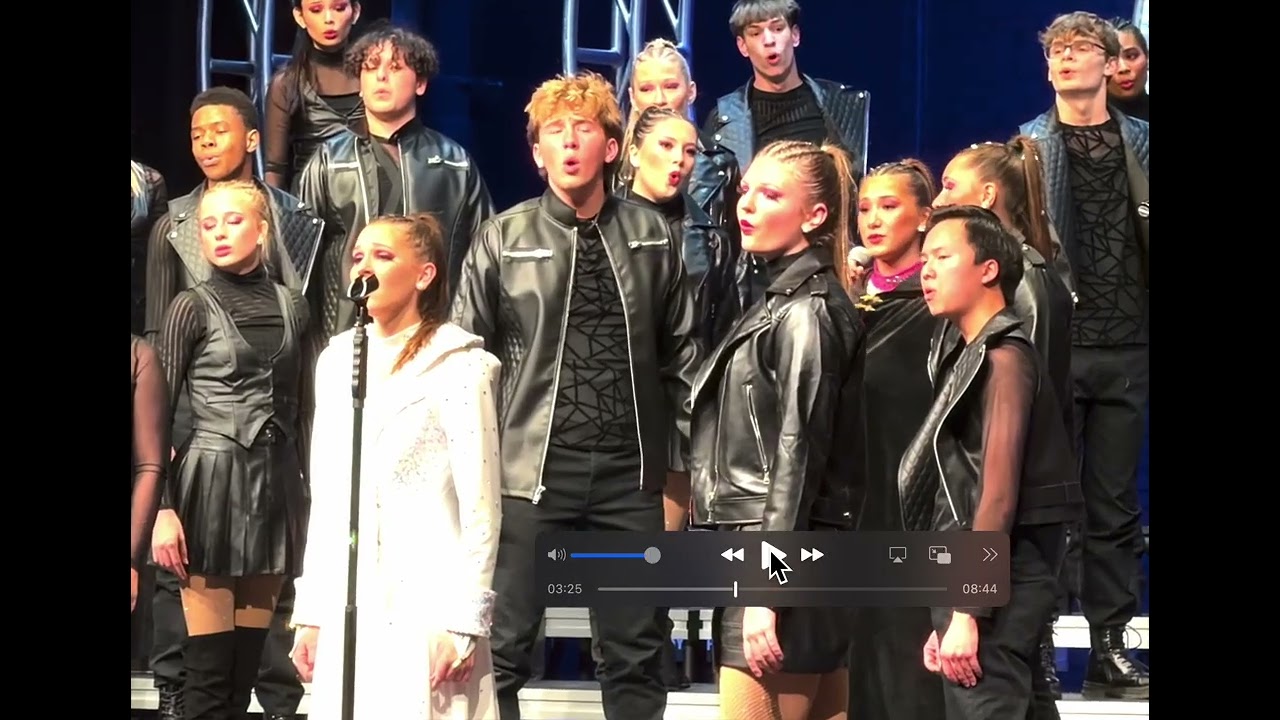
The main reason that I opted for the 17 Pro was for the advanced video features, specifically the multi lens advantages; I could really use some help getting the most out of this camera, and I assume I don’t have the settings ideally adjusted for the situation. I’ve seen plenty of great video shot with this model phone, and I’d like to do the same.
Example: I took some video of an HS show choir performance, and at multiple times during the recording the quality would “snap” back and forth between blurry / blown out / artifacted and very clean / sharp / balanced. Contrary to what I would think, the zoomed-out results were worse than the zoomed-in video. I snipped a bit of the video as one example. There were numerous others but always at the same zoom transition, it seemed. The attached video is a screen capture from a 16" MBP of the original video as I wanted to slow down the rate to frame-by-frame. Therefore, the original quality is reduced. This lowered the quality (exposure, sharpness) a noticeable amount, but the “snap” is still relative and obvious (the good parts of the original video are stunning on the MBP). The zoom was always at least 1x, but never past 8x, as far as I recall. I never needed a wide angle.
A few details:
Camera Adjustments, Lock Focus and Exposure, Apple ProRes - off,
Photographic Style - Standard, Record Video - 4K at 30 fps, Record Cinematic - 4K at 30 fps
High Efficiency, Lens correction & Macro Control - on
Any advice from iphone video gurus? That snap from bad to good at some zoom amount is the thing that really caught my attention - I was hoping I could get better results than with my 10+ y.o. Canon PowerShot!
I am by no means an expert, but based on the clip you shared, there are a few things that pop out.
When shooting video, lock your exposure on the subject you’re interested in. You can do this by tapping on the subject, and then holding down on that until it shows it’s been locked. Now, when you move around, you won’t get those changes in highlights, and auto-focus. It will result in more consistent footage. You can always tap a new subject or scroll up/down to adjust. It’s quite manual but I’ve had very good results.
Don’t zoom in/out during the shot. Especially for fractional steps (i.e 1.3x). This is always a digital crop where the pixels are getting blown up, and likely why your zoomed in (4x) footage when using that lens looks better. It’s because it’s a truly full use of the sensor. This is also likely the explanation why you see better results from your old point and shoot. That likely had a physical zoom where the lenses were adjusting to zoom in, never a sensor crop. The iPhone simply can’t do that due to physical sizes. It’s amazing what it can do, but the laws of physics are cruel and unyielding.
Yes, that’s a good idea, but I don’t think it helps much if you don’t move, right? I’ve been using that technique for locking onto a particular object when there is a substantial contrast. That often helps a lot.
So… no live zooming? Just jumping from 1x to 2x, etc? That seems like something Apple would have considered, at least for the extra $300 for the Pro model. I understand what you’re saying, but I’m not sure that’s necessarily the case. E.g., You can’t see this in the sample video, but after the “snap” to the high quality video, I zoom in and out a few times and the quality does not change - it simply zooms in and out, with no effect on sharpness, color, or brightness. But then once I get past that certain point, zooming out, everything goes screwy again.
I will continue pursuing this, and I’ll have to do some testing of different settings.
I actually use this technique especially if I’m going to move a lot. An example is if I’m filing my kid on his bike. I will lock in on him for exposure and focus before the shot starts and then run along side. Beyond a pretty limited distance, the iPhone’s focus is always going to be roughly the same for the whole scene, which is why you don’t get a lot of natural bokeh on the phone except for very close objects. As for the exposure, by locking in at the onset to the value you like, you won’t get these major compensation shifts as you move around the and light changes briefly, such as when light comes through the trees. It will be more consistent and feel more natural/cinematic. Of course, if there’s a big consistent change in light levels, you’ll want to re-lock in on a level you like, but I haven’t had to do that.
Unfortunately, yes, no live zoom. The same problem exists on your old point and shoot if you get past the optima zoom range and get into the digital zoom range. All of a sudden, quality diminishes rapidly as you’re just blowing up pixels. Another thing to consider is that your phone actually has 3 completely different cameras, not 3 different lenses. They all have their own sensors and characteristics. Different lenses with varying optical qualities, and different sensors well. Apple is doing software wizardry to make it seem like it’s a single camera. Your point and shoot on the other hand has the physical room to move the lens around to adjust the zoom on the same sensor. So at the very least, it will be consistent.