Hello,
I’m wondering if it’s possible to recategorise a macOS ‘service’ so that it is accessible through MS Word. Details below.
I have set a simple keyboard shortcut for MS Word that puts the current file I’m working on into an email to be sent to a colleague. This is the same as going to “file–share–send document”. However nowadays I am using Mail significantly less, and wanted to move these files directly into other programmes, such as MS Teams, Yoink or even straight to DEVONthink without having to find the relevant file in the Finder first.
I’ve created a simple MacOS ‘service’ to be able to do this, however MS word doesn’t show this as an option when I go to the menu bar “word–services” and it only shows services that are in the category “Searching”:
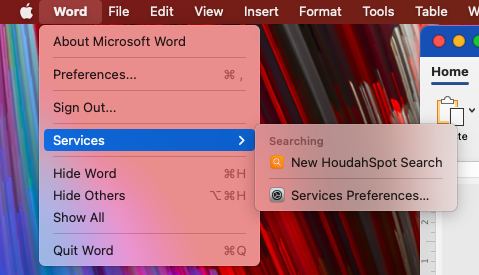
Does anyone know whether it is possible to change the ‘category’ that a service is in? Or to expand the categories that MS Word can show in the menu?
If I’ve not been clear please do let me know. With thanks in advance
Ed
To clarify:
- Which category does your action fall in services preferences?
- Is your action enabled in Services Preferences?
Word doesn’t really seem to manage those. What is available may depend on the context. On my system, for example, when I select some text in Word the list becomes noticeably longer as extra text-related actions are added.
The category is defined in the Automator when creating a quick action by choosing something in the “Workflow receives current” drop down menu.
1 Like
Thanks for your help. No joy, though, I still can’t make it work but I think it might be a limitation of the system and maybe I need to look at applescripting it.
To answer your questions
- yes the service was checked
- no matter which ‘input’ is selected in Automator it still doesn’t show in the word category list. (Not quite true- if I select ‘no input’ it shows, however nothing is then passed for the service to act on).
Cheers
Have you considered a good old drag’n’drop? If you do that to the little Word document icon in the middle of the title bar you can pass it to another app. Sometimes you can just drop it onto its icon in the dock (eg. dropping onto a new icon creates new message with an attachment) or the window itself. MS Teams supported the latter one which impressed me quite a bit as I always approach it with zero expectations.
This way you don’t need to locate the file in Finder.