I have a MacBook Pro M1 / Ventura and two photo libraries on an external hard disk, one being 40 GB and the other 75 GB in size. However, when I attempt to open them with Photos, I encounter the following error message for both libraries: “The operation couldn’t be completed. (PHPhotosErrorDomain error 4302.)”
In an attempt to resolve this issue, I initiated Photos in repair mode. The process progresses smoothly until it reaches 99%, at which point it halts with the spinning wheel. I’ve tried multiple repair attempts, yet they all yield the same outcome.
Considering the possibility of a corrupted hard disk, I transferred the libraries to a completely new external hard drive. To my dismay, I encountered the exact same result.
Here on the forum, I found this thread, but it didn’t do not really offer any help and is about three years old. Anything you on this matter since then?
I would greatly appreciate any assistance in identifying the problem and finding a solution. Thank you in advance for your help!
Best regards,
Per
How is the external hard drive formatted? This error appears to be linked to a Photos library being on an external drive that isn’t formatted as APFS for MacOS Extended Journaled. If neither external disk is formatted in one of these formats, I suggest you format the new external disk (using Disk Utility) as APFS then copy set the “ignore ownership” flag:
Click on drive (or partition) icon in Finder
Open the Get Info dialog
At the bottom, click lock and enter password
Put a check into “ignore ownership on this volume” in sharing and permissions
Then copy the libraries to this drive and try to open them again.
I agree with @Rhet_Turnbull. I also keep my Photos library on an external SSD which works flawlessly. It is formatted APFS.
Both the external discs I have tried so far are formatted as APFS.
At the moment, I cannot check how the flag is set because I just lost my display on my MacBook Pro.
 Could only this cause the problem?
It’s possible if the library was copied with the wrong permissions but if both volumes are already formatted as APFS I suspect there’s some corruption of the Photos database. I’d first try to set the ignore ownership flag. If that doesn’t work, I can provide some ideas for how to get all the photos out of the library and start over with a fresh library.
Thank you!  I will attempt to follow your instructions today. Unfortunately, I am facing a slight challenge as my MacBook Pro no longer has a functioning display. However, I will endeavor to find a solution and will inform you about the outcome.
As you see on the screenshot, the disk should be set to ignore ownership. Or am I wrong here? If I’m right, I am definitely stuck.
 Per
Per
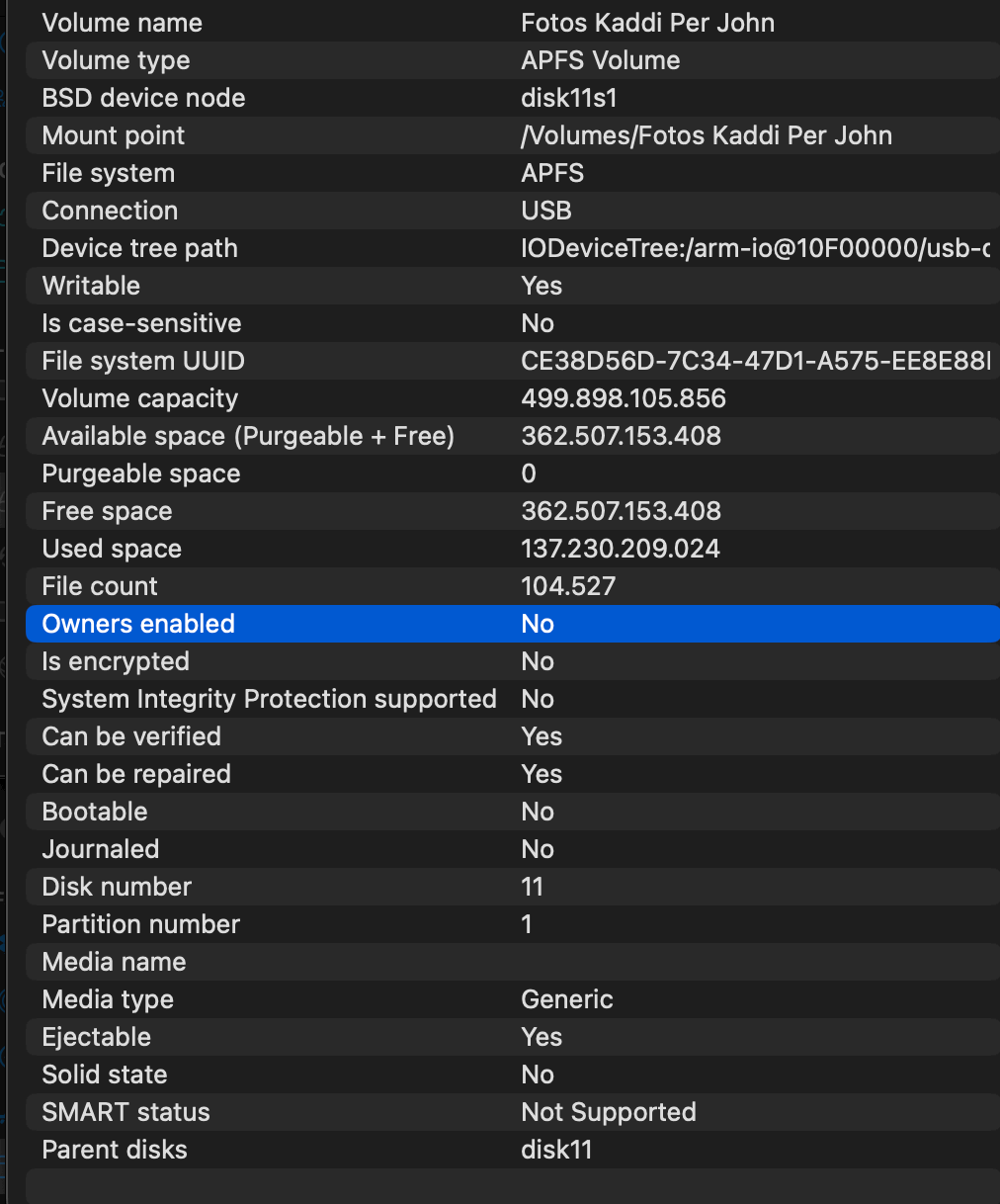
That looks right. I assume you’re still having trouble reading the library off that disk?