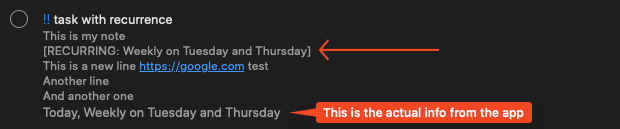
Backing up Reminders (or lack thereof) is what probably makes users find alternatives. I’d hope that in 2025 Apple would be competing with other companies with such basic features, but… well, it’s Apple.
Today, I spent a few hours going back and forth with ChatGPT and Claude, because I’m not a developer myself, but I know enough to ask the right questions, and I came up with this final semi-solution. Why “semi-solution”?
1 - This doesn’t export all the information in Reminders (if someone who knows how to achieve that, please share)
2 - This is just a “safety net” so we don’t completely lose everything in Reminders. It’s not a “restore” solution, but considering that losing all reminders is something that is probably a 1 in a million chance, this is just there to guarantee that we don’t lose everything!
SUMMARY
-
This was done on Catalina, so if something doesn’t work for you in other macOS versions, let me know.
-
This uses AppleScript, which can run inside Script Editor (or Script Debugger) and/or can be converted into an app (permissions are requested when it runs the first time - instructions below).
-
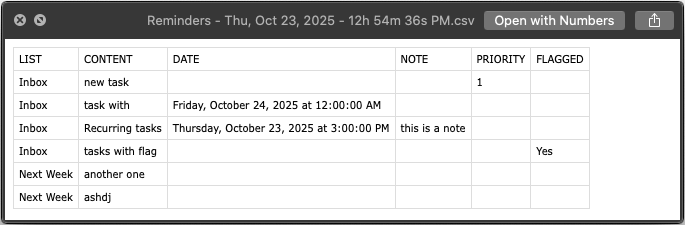
The final file will be a CSV file with the current date and time (images below).
-
Completed tasks can be included or excluded by default on every run, or a dialog can be shown on every run (more about this below)
LIMITATIONS:
- List Groups are not included
- URLs are not included
- Recurring tasks are not shown properly, for example if a task is set to be every 3rd and 17th or the month, that information isn’t shown, just when the task is next due
- Attachments are not included
- Maybe other things are not included, but at the moment these are the ones I can think of.
User Setup
At the very top of the script, there are 3 sections to define:
1 - The path where the final CSV file will be saved (short or full paths will work)
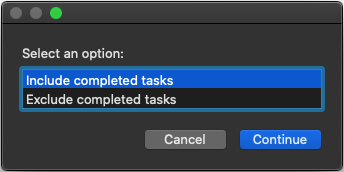
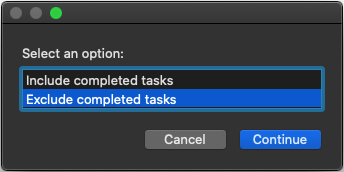
2 - If a dialog is shown where you can pick whether to include or exclude completed tasks
3 - The default for those completed tasks (include or exclude, regardless of it showing the dialog or not)
I tried my best to document everything the best way possible and asked ChatGPT and Claude to name variables in a way that (hopefully) makes everything simple to understand.
---- USER SETUP ----
-- Export path. It works with both short paths (~/Desktop) and full paths (/Users/yourusernamehere/Desktop)
set export_path to "~/Desktop"

-- Default for completed tasks
---- Set to "true" if you want the dialog to show where you can pick if you want to include or exclude completed tasks
set completed_tasks_show_dialog to false

---- Set to "true" if you want the "Include completed tasks" option to be selected by default when "completed_tasks_show_dialog" is set to "true". If "completed_tasks_show_dialog" is set to "false", this setting will determine if every export will include or exclude completed tasks
set completed_tasks_default_include to false
Run The Script
You can run the script directly in Script Editor or Script Debugger. If you decide to save this as an app, here are the steps:
1 - Once you have everything set up the way you want it, go to File > Export…
2 - In the next window, change the File Format to Application:
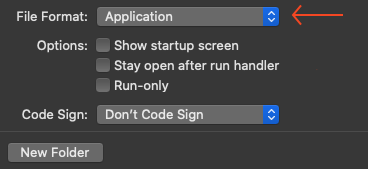
3 - Give it a name (I used Reminders - Backup) and that will give you this in Finder:

Allow Access When Saved As An App
When you first try to run it as an app, you will be presented with dialogs asking for permission. Here they are in order of appearance:
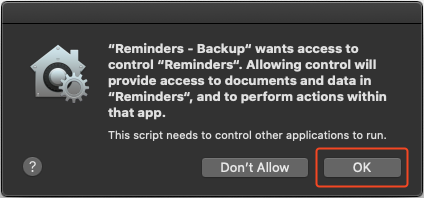
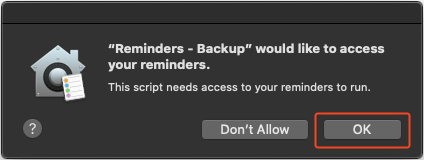
Include or Exclude completed tasks
If you set it up to show the dialog, you will see one of these, depending on what the default for completed tasks is:
The Output
You will get a file that looks like this:

and will have the content similar to this (whether completed tasks are included or excluded):

You will see a notification at the end:

Script (copy and paste into Script Editor / Script Debugger):
Click to expand
use AppleScript version "2.4"
use scripting additions

---- USER SETUP ----
-- Export path. It works with both short paths (~/Desktop) and full paths (/Users/yourusernamehere/Desktop)
set export_path to "~/My Files/Inbox Global"

-- Default for completed tasks
---- Set to "true" if you want the dialog to show where you can pick if you want to include or exclude completed tasks
set completed_tasks_show_dialog to false

---- Set to "true" if you want the "Include completed tasks" option to be selected by default when "completed_tasks_show_dialog" is set to "true". If "completed_tasks_show_dialog" is set to "false", this setting will determine if every export will include or exclude completed tasks
set completed_tasks_default_include to false

------------------------------------------------------------

-- Ensure path ends with /
if export_path does not end with "/" then set export_path to export_path & "/"

-- Handler to format date as Thu, Oct 23, 2023 - 11h 51m 23s PM
on formatDate(d)
	set {wd, mo, dayNum, yearNum, hoursNum, minutesNum, secondsNum} to {weekday of d, month of d, day of d, year of d, hours of d, minutes of d, seconds of d}

	-- Weekday short name
	set weekdayStr to ""
	if wd = Sunday then set weekdayStr to "Sun"
	if wd = Monday then set weekdayStr to "Mon"
	if wd = Tuesday then set weekdayStr to "Tue"
	if wd = Wednesday then set weekdayStr to "Wed"
	if wd = Thursday then set weekdayStr to "Thu"
	if wd = Friday then set weekdayStr to "Fri"
	if wd = Saturday then set weekdayStr to "Sat"

	-- Month short name
	set monthStr to ""
	if mo = January then set monthStr to "Jan"
	if mo = February then set monthStr to "Feb"
	if mo = March then set monthStr to "Mar"
	if mo = April then set monthStr to "Apr"
	if mo = May then set monthStr to "May"
	if mo = June then set monthStr to "Jun"
	if mo = July then set monthStr to "Jul"
	if mo = August then set monthStr to "Aug"
	if mo = September then set monthStr to "Sep"
	if mo = October then set monthStr to "Oct"
	if mo = November then set monthStr to "Nov"
	if mo = December then set monthStr to "Dec"

	-- 12-hour format with AM/PM
	set ampm to "AM"
	set hours12 to hoursNum
	if hoursNum = 0 then
		set hours12 to 12
	else if hoursNum ≥ 12 then
		if hoursNum > 12 then set hours12 to hoursNum - 12
		set ampm to "PM"
	end if

	-- Leading zeros
	set minutesStr to text -2 thru -1 of ("0" & minutesNum)
	set secondsStr to text -2 thru -1 of ("0" & secondsNum)

	return weekdayStr & ", " & monthStr & " " & dayNum & ", " & yearNum & " - " & hours12 & "h " & minutesStr & "m " & secondsStr & "s " & ampm
end formatDate

-- Handler to extract recurring info from notes
on extractRecurring(noteText)
	set recurringInfo to ""
	set cleanedNote to ""

	-- Replace different line break types with return
	set noteText to replaceText(noteText, linefeed, return)
	set noteText to replaceText(noteText, ASCII character 13, return)

	set AppleScript's text item delimiters to return
	set noteLines to text items of noteText
	set AppleScript's text item delimiters to ""

	repeat with currentLine in noteLines
		set lineText to currentLine as text
		set upperLine to do shell script "echo " & quoted form of lineText & " | tr '[:lower:]' '[:upper:]'"
		if upperLine contains "[RECURRING:" then
			set startPos to offset of "[RECURRING:" in upperLine
			set endPos to offset of "]" in upperLine
			if endPos > startPos then
				set recurringInfo to text (startPos + 11) thru (endPos - 1) of lineText
			end if
		else
			if cleanedNote is "" then
				set cleanedNote to lineText
			else
				set cleanedNote to cleanedNote & return & lineText
			end if
		end if
	end repeat

	return {cleanedNote, recurringInfo}
end extractRecurring

-- Helper to replace text
on replaceText(theText, oldText, newText)
	set AppleScript's text item delimiters to oldText
	set tempList to text items of theText
	set AppleScript's text item delimiters to newText
	set theResult to tempList as text
	set AppleScript's text item delimiters to ""
	return theResult
end replaceText

-- === Main script ===

-- Handle dialog logic
if completed_tasks_show_dialog then
	if completed_tasks_default_include then
		set defaultSelection to {"Include completed tasks"}
	else
		set defaultSelection to {"Exclude completed tasks"}
	end if

	set userChoice to choose from list {"Include completed tasks", "Exclude completed tasks"} with prompt "Select an option:" default items defaultSelection OK button name "Continue" cancel button name "Cancel"
	if userChoice is false then return
	set includeCompleted to (item 1 of userChoice = "Include completed tasks")
else
	set includeCompleted to completed_tasks_default_include
end if

-- Timestamped CSV filename
set csvFile to (do shell script "eval echo " & quoted form of (export_path & "Reminders - " & formatDate(current date) & ".csv"))

-- CSV header
set csvOutput to "LIST,CONTENT,DATE,NOTE,PRIORITY,FLAGGED,RECURRENCE"
if includeCompleted then set csvOutput to csvOutput & ",COMPLETED"
set csvOutput to csvOutput & linefeed

tell application "Reminders"
	repeat with l in lists
		set listName to name of l
		repeat with r in reminders of l
			set taskContent to name of r
			set taskDue to ""
			set taskNotes to ""
			set taskPriority to ""
			set taskCompleted to ""
			set taskFlagged to ""
			set taskRecurring to ""

			if due date of r is not missing value then set taskDue to due date of r as text

			-- Convert priority values to names
			set priorityValue to priority of r
			if priorityValue is 1 then
				set taskPriority to "High"
			else if priorityValue is 5 then
				set taskPriority to "Medium"
			else if priorityValue is 9 then
				set taskPriority to "Low"
			else
				set taskPriority to ""
			end if

			if completion date of r is not missing value then set taskCompleted to completion date of r as text
			if flagged of r is true then set taskFlagged to "Yes"

			-- Process notes to extract recurring info
			if body of r is not missing value then
				set noteResult to my extractRecurring(body of r)
				set taskNotes to item 1 of noteResult
				set taskRecurring to item 2 of noteResult
			end if

			-- Wrap fields in quotes
			set csvOutput to csvOutput & "\"" & listName & "\","
			set csvOutput to csvOutput & "\"" & taskContent & "\","
			set csvOutput to csvOutput & "\"" & taskDue & "\","
			set csvOutput to csvOutput & "\"" & taskNotes & "\","
			set csvOutput to csvOutput & "\"" & taskPriority & "\","
			set csvOutput to csvOutput & "\"" & taskFlagged & "\","
			set csvOutput to csvOutput & "\"" & taskRecurring & "\""

			if includeCompleted then set csvOutput to csvOutput & ",\"" & taskCompleted & "\""
			set csvOutput to csvOutput & linefeed
		end repeat
	end repeat
end tell

-- Save CSV
do shell script "echo " & quoted form of csvOutput & " > " & quoted form of csvFile

-- Show completion notification
display notification "✅ Reminders Backup Completed!" with title "Backup Status"
If you will be using this as an app, I recommend that you also save the script as an editable file in case you want to edit it in the future.
EDIT (Nov 17, 2025): I noticed that this doesn’t export sub tasks and doesn’t read lists inside Groups. I will eventually see if there’s a way to fix this, because I really want to use this method without flaws, and once it’s fixed (hopefully it will), I will share it here. For now, I avoid using sub tasks or groups.