My Fujitsu iX500 stopped working after upgrading to MacOS 27. What scanner would you recommend as a replacement for my paperless workflow that works with MacOS 27? Thx
I was going recommend ScanSnap IX1400 but it looks like it’s discontinued.
get this one instead: ScanSnap iX2400
1 Like
If the problem is the ScanSnap software, you might want to try using [Vuescan] before you replace your scanner (https://www.hamrick.com/). Vuescan is a universal scanner driver. I use it for both my iX500 and an Epson flatbed scanner. (I’m not on MacOS 27, however.) It’s pricey, but cheaper than a new scanner.
4 Likes
Interesting.
What are you using? ScanSnap Manager or ScanSnap Home?
As macOS 27 is currently in beta, it may be this bug:
Apparently, it may or may not have been introduced with macOS 27 Beta 3. It is not related to the iX500 as other models are affected, too. According to that and other Reddit threads (https://www.reddit.com/r/ScanSnap/):
- Scans complete the feed process, but the app gets stuck on “Image Processing” due to an inter-process communication change in the operating system beta.
- Although the interface freezes, underlying PDF files are typically written to temporary storage before the lockup occurs.
- Ricoh/Fujitsu does not officially support pre-release or beta versions of macOS (nothing new).
If this is your issue, it may be resolved when macOS 27 is released.
EDIT - the issue also was mentioned over here:
2 Likes
As I indicated in the other thread, I’m now using NAPS2 until Fujitsu gets their software updated. In some ways it’s actually better than ScanSnap Home—much cleaner UI— but the main downsides are a) no wifi, only USB, and b) the buttons on the scanner are non-functional. So I’m pretty sure I will switch back to ScanScan Home once it’s updated even though I despise the user experience.
View scan doesn’t support WiFi for the ix500. I tried getting it to work a couple of months ago and their support people told me that only USB is supported for that scanner
1 Like
I never use the wifi connection, so I didn’t notice it was missing in VueScan.
It won’t suit everybody, but for receipts and documents I now just “scan” directly into KeepIt using my iPhone camera. It’s surprisingly easy to do and very effective with just a modicum of thought. My main tip is to get the phone at about the right distance while pointed away from the subject, otherwise it can sometimes fire too early and get a lower resolution result.
1 Like
It’s a beta issue. I have it as well, but I’ll wait. (I’m still waiting for a 1200 optical DPI document scanner, and when that day comes, I’ll buy something new.)
- Although the interface freezes, underlying PDF files are typically written to temporary storage before the lockup occurs…
Do we know where this temporary storage is? 
Somebody does. 
1 Like
Unfortunately I don’t have the username folder in my system.
I looked in my home folder as well, with no luck.
Will do a date scan next time I scan to see where it goes!

start from the root of you Mac-drive, there is a “Users” inside is your account.
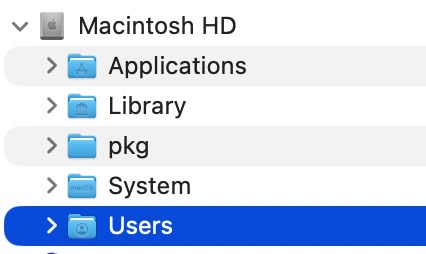
Thanks, I’m aware.
However, there is no tmp/temporary folder in my Home folder, nor in the Library folder (hidden or visible).
These are my invisble folders:
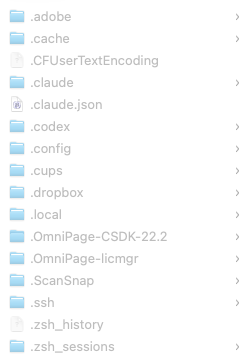
(the ScanSnap folder contains an empty folder from February)
…and the /private folder that Christian refers to does only exist at root level, AFAIK.
You have to check for the tmp/temporary folder while ScanSnap Home is running. If the software is closed, the folder gets deleted - because its only temporary. 
2 Likes
Ricoh has released a beta ScanSnap Home that works with macOS 27 beta!  . And they predict version 4.1 in October for the permanent fix. I tried the beta and can scan from my ix1500.
5 Likes
I just use the built-in scanner function on my phone. I don’t use any third-party software. I point the iphone ‘Files’ app at my desktop on iCloud. And then press the scan document function, which works perfectly well.
I do use DEVONthink and use Hazel to move the file subsequently into DEVONthink inbox and do OCR on it.
1 Like
I have kept ScanSnap Manager for my scanners, and as I understand it, it will still run under MacOS 27 albeit I’ll need to manually install Rosetta for that. And 27 will be the final OS to support Rosetta.
I spent some time just a couple of weeks ago playing with VueScan, considering if I should get used to it ahead of installing MacOS 27. My conclusion is that I will not. I was pretty unsatisfied with it as a document scanner. No amount of tinkering with it and some LLMs offering suggestions could replicate the type of output I get with ScanSnap Manager.
Ultimately, I came to the view that VueScan is very good for photo scanning, but mediocre for document scanning.
I did try ExactScan for documents, and with a bit of tweaking, was able to get something almost the same as ScanSnap Manager outputs, with sharp text, high contrast, no bleed through, and bright colours. When I can no longer use ScanSnap Manager at all, that will be my fallback, but I’m deferring until I have no choice.
I tried ScanSnap Home, but was underwhelmed by it, to put it mildly, and thought it gave the same washed out, soft, output that VueScan gave me.
No problems here with the quality of ScanSnap Home. May some wrong setting in the scan-profile you use? Those are my settings for the S1300i.

I use my scanner with MacOS built-in app ImageCapture. Did you see if that app recognized your scanner?